Beta 2 of IE 7.0 is Released
Yeah, I’ve been using a pre-Beta 2 version for awhile now, and I’m loving it. Click here (or the logo graphic) to learn more about the new features, and to download beta 2 for yourself.
Seriously – I’m hooked on the RSS feed support, and on tabs.
Click here
Thursday, April 27, 2006
Tuesday, April 25, 2006
Microsoft Announces Windows Media Encoder Studio Edition Beta
Today at the National Association of Broadcasters convention, NAB2006, Microsoft Corp. announced availability this week of a new addition to the Windows Media® tools family, Windows Media Encoder Studio Edition. The beta encoder is a powerful tool for video professionals, optimized for the creation of high-quality offline encoding using Microsoft’s implementation of the VC-1 video standard (Windows Media Video). Windows Media Encoder Studio Edition beta provides the key features necessary to create next-generation video content and capitalize on the growing importance of optical media and video-on-demand scenarios.
“With the final standardization of VC-1, Windows Media Encoder Studio Edition will prove to be an invaluable tool for the offline encoding community,” said Amir Majidimehr, corporate vice president of the Windows® Digital Media Division at Microsoft. “This is another example of how Microsoft is providing the end-to-end solutions for content creation and meeting the evolving demands of the professional video community.”
Windows Media Encoder Studio Edition Beta Info at Microsoft's Windows Media Website
“With the final standardization of VC-1, Windows Media Encoder Studio Edition will prove to be an invaluable tool for the offline encoding community,” said Amir Majidimehr, corporate vice president of the Windows® Digital Media Division at Microsoft. “This is another example of how Microsoft is providing the end-to-end solutions for content creation and meeting the evolving demands of the professional video community.”
Windows Media Encoder Studio Edition Beta Info at Microsoft's Windows Media Website
Sunday, April 16, 2006
Google Calendar: be afraid Microsoft, be very afraid
The latest Google web service offering, Google Calendar, may not be the end all and be all of desktop organisers. It may not have any special features that cannot be found in other organiser products, such as Microsoft Outlook. However, it is just one more nail in the coffin of the old software paradigm that Microsoft made its own in the 1980s.
It seems that not a week goes by without Google announcing some new free software service that can be accessed from a web browser. It is busily building a bunch of direct competitors to Microsoft in both the web services and desktop space. GMail of course competes with rivals Microsoft Hotmail and Yahoo! Mail in the free email market. It is, however, on the desktop where Microsoft makes most of its money and it is the desktop which Google threatens to make redundant for many users.
Google Calendar, which is still a beta project, may not be any better than Outlook’s calendar but, unlike Outlook, it is free. It is operating system agnostic. All you need is the web browser of your choice. That’s a frightening prospect for a Microsoft, not so much because some of its customer may not want to use Outlook for calendar functions anymore, but because of the implications for the product group where it makes the bulk of its money, Office.
Last month, Google acquired web-based word processor Writely from a tiny Silicon Valley startup called Upstartle. A cursory examination of the product then showed that, unlike the free product from Open Office.org, Writely was by no means ready to put in a bid as a serious challenger for Microsoft Word. However, it showed enough that in the hands of a development team backed by the resources of a Google, plus the company’s global server power to deliver reliable web services, it could eventually make Word redundant for many users.
Slowly the web services jigsaw puzzle that Google is building is starting to form. It now has an email product, a word processor, a calendar and a web page builder (Google Page Creator). All of these products will be funded by Google’s advertising model.
We should not be surprised and indeed fully expect to see a number of additional web-based office productivity tools appear from Google in ensuing months. As soon as web service equivalents to Excel and Power Point make an appearance, Microsoft may need to consider seriously how much longer it can stick with its legacy business model of the 1980s.
Also see Apple & Windows
It seems that not a week goes by without Google announcing some new free software service that can be accessed from a web browser. It is busily building a bunch of direct competitors to Microsoft in both the web services and desktop space. GMail of course competes with rivals Microsoft Hotmail and Yahoo! Mail in the free email market. It is, however, on the desktop where Microsoft makes most of its money and it is the desktop which Google threatens to make redundant for many users.
Google Calendar, which is still a beta project, may not be any better than Outlook’s calendar but, unlike Outlook, it is free. It is operating system agnostic. All you need is the web browser of your choice. That’s a frightening prospect for a Microsoft, not so much because some of its customer may not want to use Outlook for calendar functions anymore, but because of the implications for the product group where it makes the bulk of its money, Office.
Last month, Google acquired web-based word processor Writely from a tiny Silicon Valley startup called Upstartle. A cursory examination of the product then showed that, unlike the free product from Open Office.org, Writely was by no means ready to put in a bid as a serious challenger for Microsoft Word. However, it showed enough that in the hands of a development team backed by the resources of a Google, plus the company’s global server power to deliver reliable web services, it could eventually make Word redundant for many users.
Slowly the web services jigsaw puzzle that Google is building is starting to form. It now has an email product, a word processor, a calendar and a web page builder (Google Page Creator). All of these products will be funded by Google’s advertising model.
We should not be surprised and indeed fully expect to see a number of additional web-based office productivity tools appear from Google in ensuing months. As soon as web service equivalents to Excel and Power Point make an appearance, Microsoft may need to consider seriously how much longer it can stick with its legacy business model of the 1980s.
Also see Apple & Windows
Saturday, April 01, 2006
Windows Live Mail Desktop beta begins!
|
 Yes it has finally started, albeit in a very small way.
 Windows Live Messenger Final - Sneak Peek
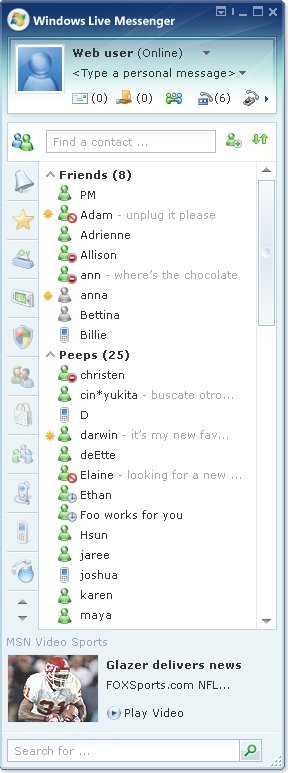
Yes I'm posting yet another screenshot, this time of the expected Windows Live Messenger final UI.
- Yes the UI looks must better, no bleaching!
- Note the new status icons, a cross between old and new.
- The two new icons at the top of the contact list refer to the new VOIP and VoiceMail features coming to Windows Live Messenger. I'll be posting more information on this shortly :-)
Update: Apparently this hasn't been 100% confirmed as the final UI yet. Parts of it are definitely the final UI whilst the other parts are still being disucssed internally. So if you want this to be the final UI, then make sure you leave a positive comment below! If you can be specific about what you do/don't like about it, then this really will make a difference to the team :-)

- Yes the UI looks must better, no bleaching!
- Note the new status icons, a cross between old and new.
- The two new icons at the top of the contact list refer to the new VOIP and VoiceMail features coming to Windows Live Messenger. I'll be posting more information on this shortly :-)
Update: Apparently this hasn't been 100% confirmed as the final UI yet. Parts of it are definitely the final UI whilst the other parts are still being disucssed internally. So if you want this to be the final UI, then make sure you leave a positive comment below! If you can be specific about what you do/don't like about it, then this really will make a difference to the team :-)
Wednesday, March 22, 2006
Windows Vista Consumer release put off until 2007, Microsoft delays wide launch of Windows Vista
Microsoft Corp. will delay the consumer release of its new Windows operating system until January 2007, missing the holiday sales season and throwing some PC makers and retailers into turmoil. Shares in the software giant slid as much as 3.3 percent in after-hours trading.
The delay in Windows Vista — caused by Microsoft needing more time to enhance security and other functions — will come as a blow to Microsoft partners who were looking forward to a new operating system to boost holiday sales.
“It’s not the optimal situation, to be launching the next-generation version of Windows right after the big holdiay sales season,” said analyst Joe Wilcox with Jupiter Research.
The company will release some versions of the new operating system for big businesses by November as planned, but the consumer version will be postponed until January, said Jim Allchin, co-president of the Microsoft division that includes Windows.
He said the decision to delay the release came after Microsoft realized that Vista would be completed several weeks later than originally planned, largely because of efforts to improve security in the new system.
That delay was enough for some retailers, computer makers and other corporate partners to say they would have trouble preparing for the holiday season.
“The fact is that we wanted everybody in the industry to be ready for this,” Allchin told journalists and analysts in a conference call.
Businesses who buy a number of Windows licenses at the same time will be able to get the system in November. Although the consumer versions will be ready at the same time, Allchin said Microsoft will essentially hold back that software so computer makers and others have time to prepare for a January release.
From MSNBC
The delay in Windows Vista — caused by Microsoft needing more time to enhance security and other functions — will come as a blow to Microsoft partners who were looking forward to a new operating system to boost holiday sales.
“It’s not the optimal situation, to be launching the next-generation version of Windows right after the big holdiay sales season,” said analyst Joe Wilcox with Jupiter Research.
The company will release some versions of the new operating system for big businesses by November as planned, but the consumer version will be postponed until January, said Jim Allchin, co-president of the Microsoft division that includes Windows.
He said the decision to delay the release came after Microsoft realized that Vista would be completed several weeks later than originally planned, largely because of efforts to improve security in the new system.
That delay was enough for some retailers, computer makers and other corporate partners to say they would have trouble preparing for the holiday season.
“The fact is that we wanted everybody in the industry to be ready for this,” Allchin told journalists and analysts in a conference call.
Businesses who buy a number of Windows licenses at the same time will be able to get the system in November. Although the consumer versions will be ready at the same time, Allchin said Microsoft will essentially hold back that software so computer makers and others have time to prepare for a January release.
From MSNBC
Friday, March 17, 2006
Thursday, March 09, 2006
Picture This: A New Look For Office
This: A New Look For Office
Screenshots of the Office 2007 User Interface
Screenshots of the Office 2007 User Interface
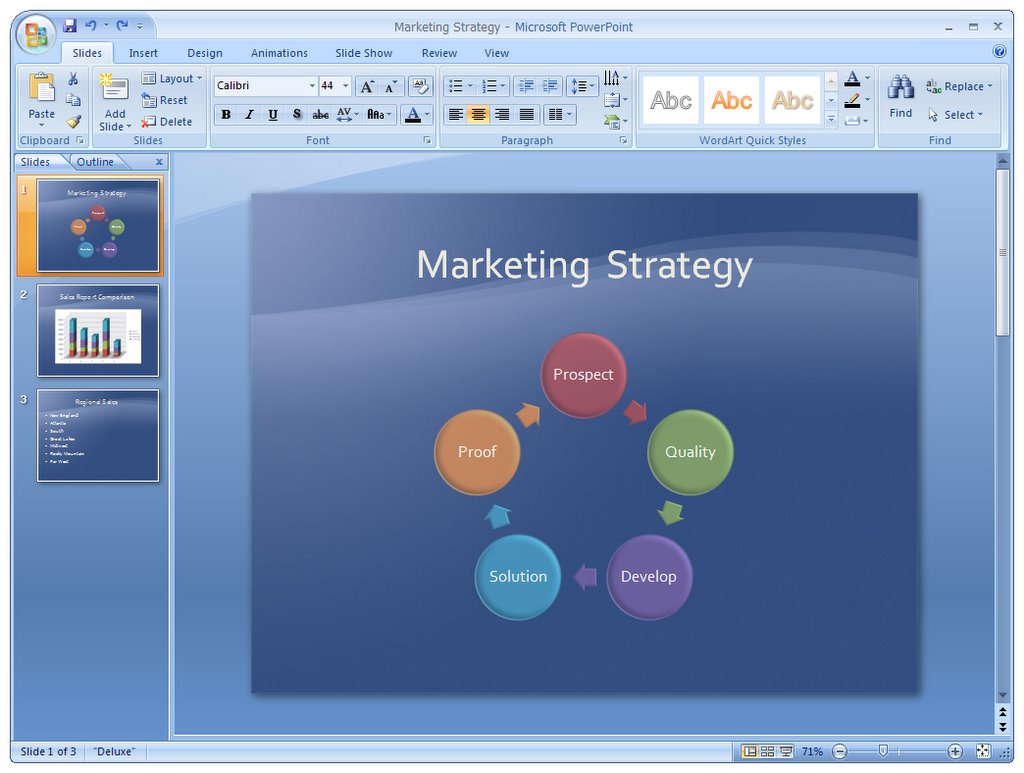
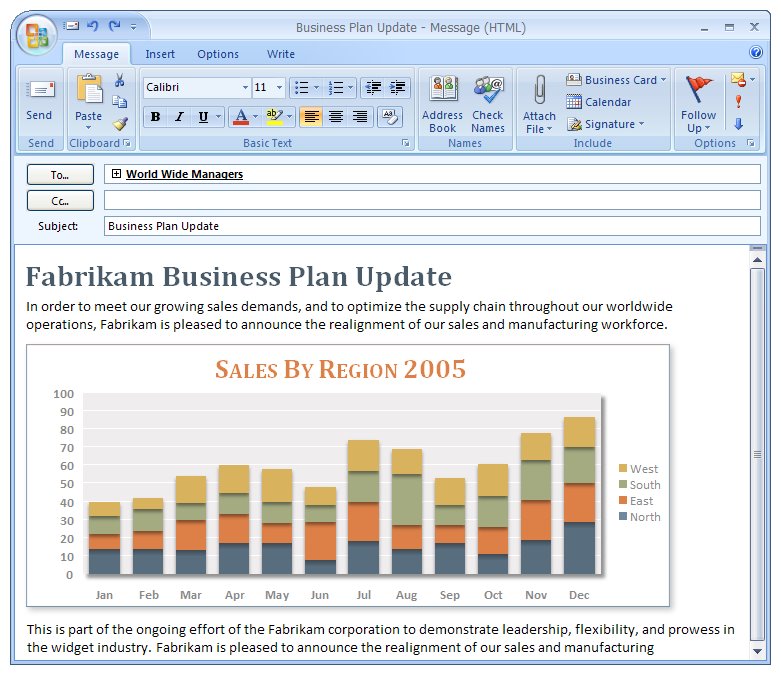
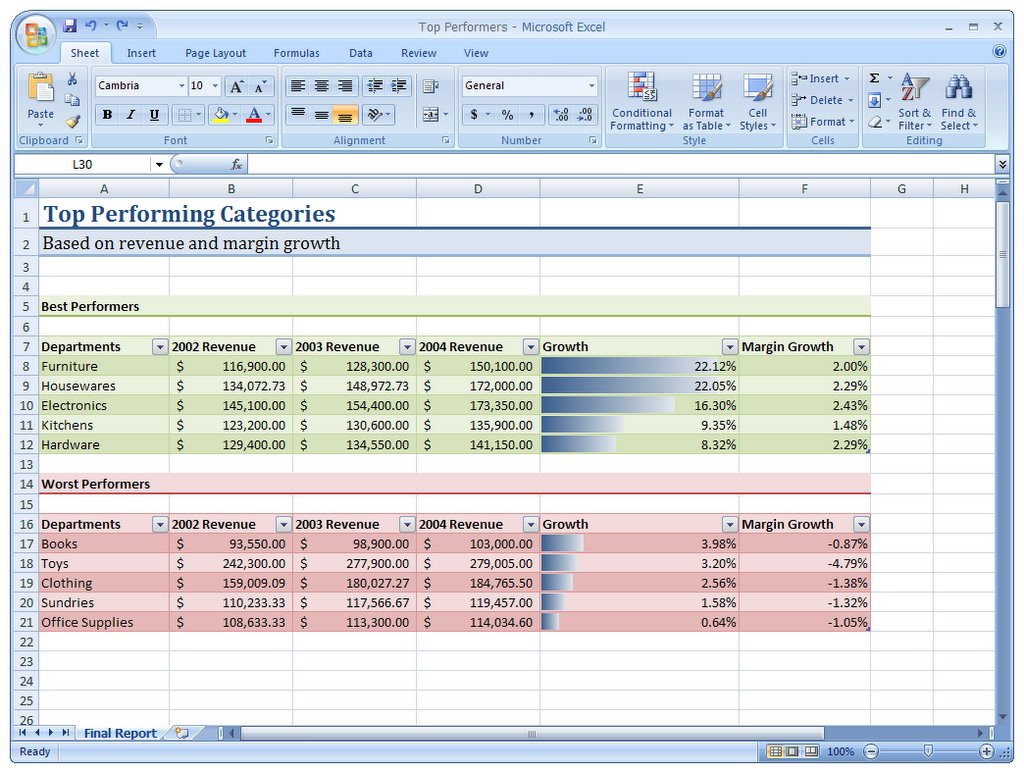
First, here are some basic screenshots of the Office 2007 programs.
There are so many changes from the Beta 1 visuals that it would be hard to make a complete list, but a couple of the things you might notice right off the bat: the Quick Access Toolbar in the title bar, group titles on the bottom of groups, and the Office Button (more on that below.)
Click each thumbnail to open a full-size version of the picture.

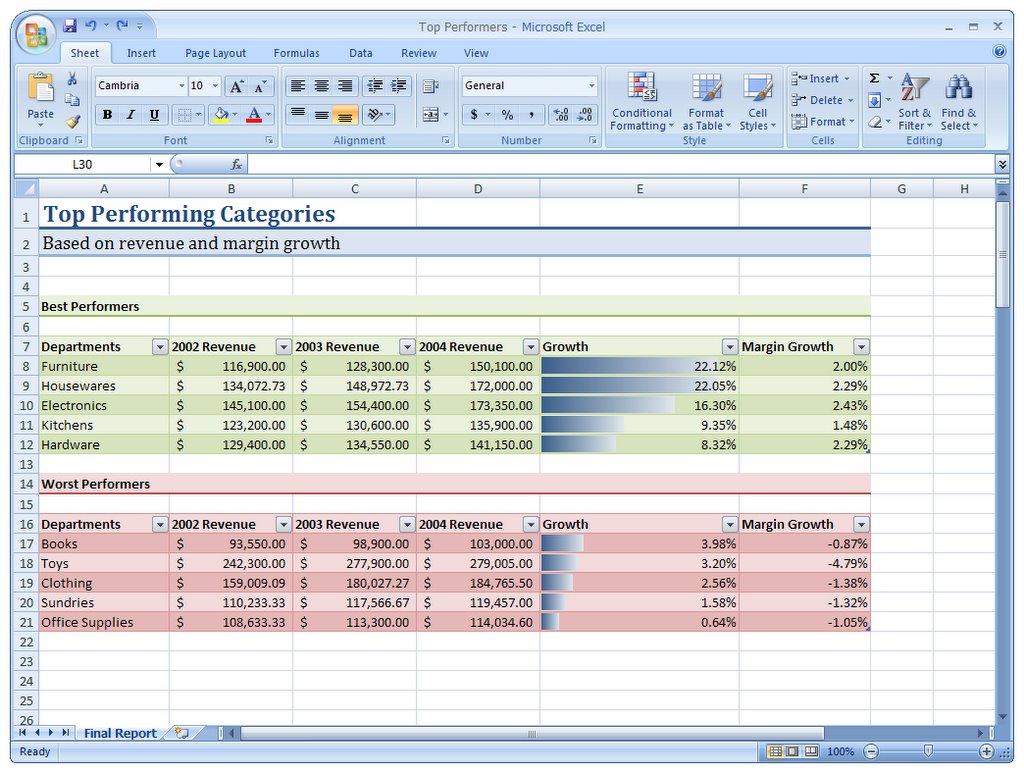
Excel 2007 - Click to enlarge picture
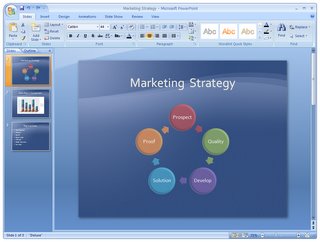 PowerPoint 2007 - Click to enlarge picture
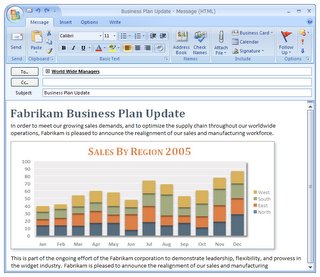 Outlook 2007 - Click to enlarge picture
 Access 2007 - Click to enlarge picture
Close-up Screenshots of the Ribbon
 The Office Button
 PowerPoint 2007 - Click to enlarge picture
 Outlook 2007 - Click to enlarge picture
 Access 2007 - Click to enlarge picture
Close-up Screenshots of the Ribbon
 The Office Button
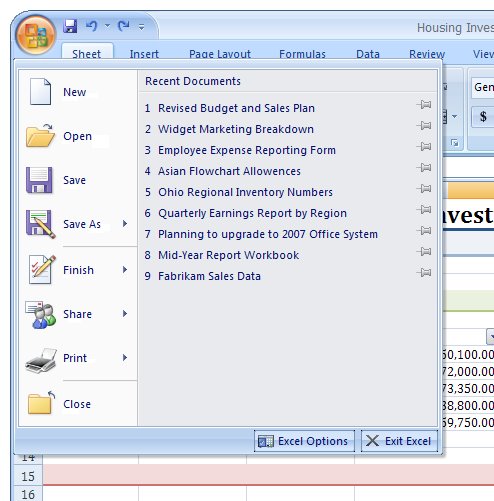
The Office Button provides access to all of the document and system-level functionality in the program. This is where you go to start doing things with your document in Office--from simply opening a file to saving as a PDF to starting a workflow or publishing the document on a server. This is where you start a document, and this is where you finish a document.
There's so much more to write about this in the future, but here's the simple screenshot of what you get when you first click the Office Button.
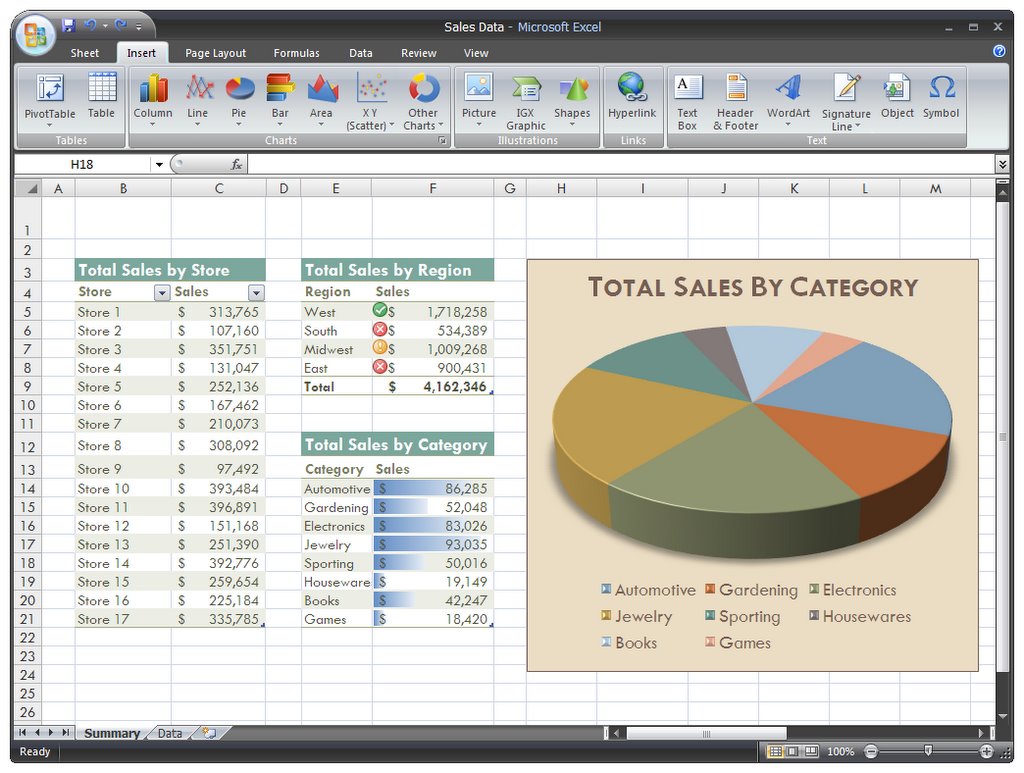
In Office 2007, we've done something else that we've never done before: given you a choice of skins for the user interface. If you don't like the default blue skin and would prefer something more neutral, we've got you covered with the striking new black skin.
 On Windows Vista, of course, we fully support glass in both skins. I'll get you some screenshots of that in the not-too-distant future.
I will update when more details available
posted Thursday, March 09, 2006
 On Windows Vista, of course, we fully support glass in both skins. I'll get you some screenshots of that in the not-too-distant future.
I will update when more details available
posted Thursday, March 09, 2006
Monday, February 27, 2006
Chart: Six versions of Vista
A Vista for all seasons
Microsoft has decided to offer six distinct versions of the Windows update. Here they are from simplest to most tricked-out.
Version
Windows Vista Starter
Sold only on new PCs in emerging markets such as India and Thailand. Runs only on 32-bit machines, and will be able to handle only a limited number of programs at a time.
Windows Vista Home Basic
Comparable to XP Home. Has the security and search abilities particular to Vista, but does not offer its fancy graphics or high-end media features.
Windows Vista Home Premium
A higher-end option for consumers. Adds support for Vista's new graphics as well as Media Center and Tablet PC features.
Windows Vista Business
Similar to XP Professional. It's the mainstream corporate OS; also contains extra tools for small businesses.
Windows Vista Enterprise
Available only to customers with volume licenses. Includes all of the features of Vista Business, with the addition of encryption, Unix services and virtual machine capabilities.
Windows Vista Ultimate
Combines the features of Windows Vista Enterprise and Windows Vista Home Premium to offer the highest-end version of Windows yet.
Note: Microsoft will also offer "N" versions of Vista Home Basic and Vista Business in Europe that have Windows Media Player removed.
Microsoft has decided to offer six distinct versions of the Windows update. Here they are from simplest to most tricked-out.
Version
Windows Vista Starter
Sold only on new PCs in emerging markets such as India and Thailand. Runs only on 32-bit machines, and will be able to handle only a limited number of programs at a time.
Windows Vista Home Basic
Comparable to XP Home. Has the security and search abilities particular to Vista, but does not offer its fancy graphics or high-end media features.
Windows Vista Home Premium
A higher-end option for consumers. Adds support for Vista's new graphics as well as Media Center and Tablet PC features.
Windows Vista Business
Similar to XP Professional. It's the mainstream corporate OS; also contains extra tools for small businesses.
Windows Vista Enterprise
Available only to customers with volume licenses. Includes all of the features of Vista Business, with the addition of encryption, Unix services and virtual machine capabilities.
Windows Vista Ultimate
Combines the features of Windows Vista Enterprise and Windows Vista Home Premium to offer the highest-end version of Windows yet.
Note: Microsoft will also offer "N" versions of Vista Home Basic and Vista Business in Europe that have Windows Media Player removed.
Wednesday, February 15, 2006
Microsoft Windows Vista Editions Finalised
According to sources close to Microsoft, the company has finalised the editions that they will be releasing mid-end of October 2006.
To co-inside with the 5 year anniversary of Windows XP, Microsoft will release the following editions:
-> Windows Vista
-> Windows Vista Business
-> Windows Vista Business N
-> Windows Vista Home Basic
-> Windows Vista Home Basic N
-> Windows Vista Home Premium
-> Windows Vista Small Business
-> Windows Vista Ultimate
Microsoft is clearly adhering to the European Commissions ruling that an unbundled version of Windows (without Windows Media Player) needs to be available to all OEMs and retail outlets hence forth.
Unfortunately we're unsure of the specifics of each version as this has not been finalised yet.
To co-inside with the 5 year anniversary of Windows XP, Microsoft will release the following editions:
-> Windows Vista
-> Windows Vista Business
-> Windows Vista Business N
-> Windows Vista Home Basic
-> Windows Vista Home Basic N
-> Windows Vista Home Premium
-> Windows Vista Small Business
-> Windows Vista Ultimate
Microsoft is clearly adhering to the European Commissions ruling that an unbundled version of Windows (without Windows Media Player) needs to be available to all OEMs and retail outlets hence forth.
Unfortunately we're unsure of the specifics of each version as this has not been finalised yet.
Subscribe to:
Posts (Atom)